SLOOP in 10 minutes
SLOOP by isod89 is a free, open-source (GPL-3.0) live groovebox firmware for the FM-1, built on Felucca. It has three synth tracks and a drum track, and you play it the way you’d play a sampler: hold a button, touch a key. It’s currently the most-starred FM-1 firmware.
Version: SLOOP 2.7. Every screen below is the official 2.7 release file running in fm1-emu, which emulates the FM-1’s chip and runs the firmware unchanged, so the screens are SLOOP’s own. The steps follow SLOOP’s README and were tried there. SLOOP’s own docs go much deeper: the README and the long GUIDE.md.
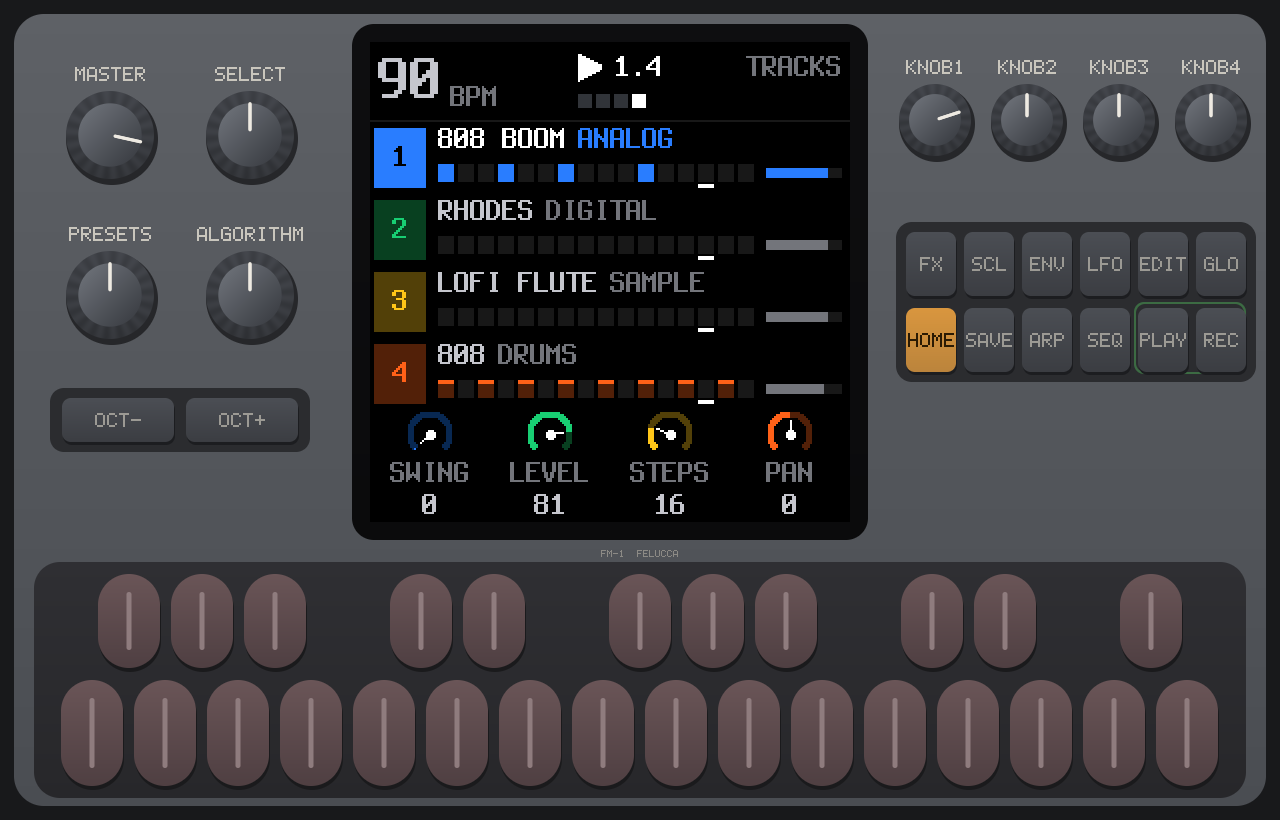
1. The one idea: layers
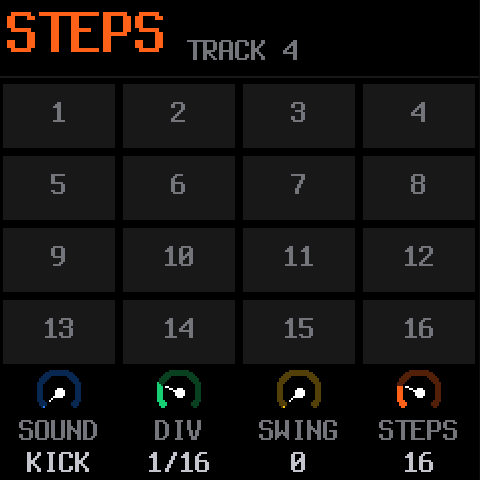
Every function button is a layer. Hold it, and the 16 white keys and the four knobs change job. The screen shows those keys as a 4 × 4 grid (keys 1–4 are the top row, 5–8 the second, and so on). Let go and you’re back to playing notes. Tap a button to open its pages instead.
| Hold | Screen | The white keys do |
|---|---|---|
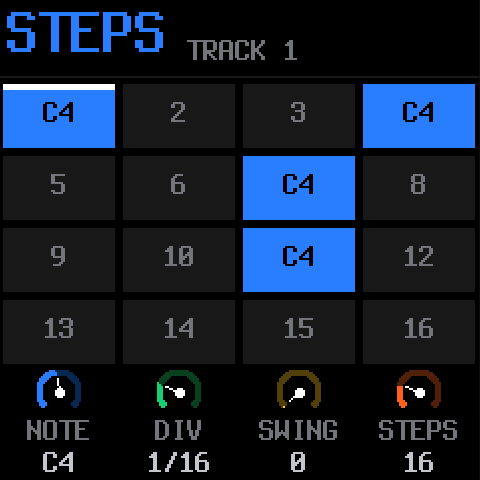
| SEQ | STEPS | the 16 steps of the selected track |
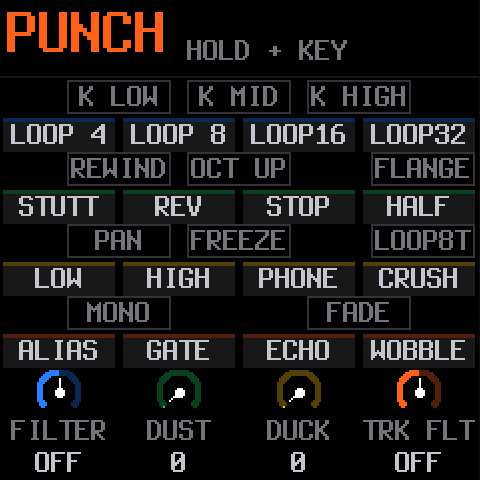
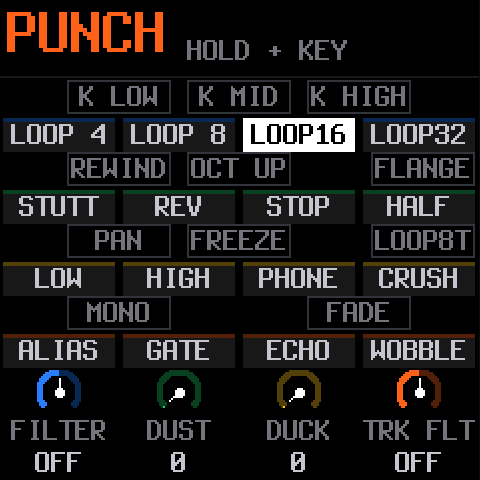
| FX | PUNCH | 27 punch-in effects on the whole mix: loops, stutter, reverse, tape stop, filters… |
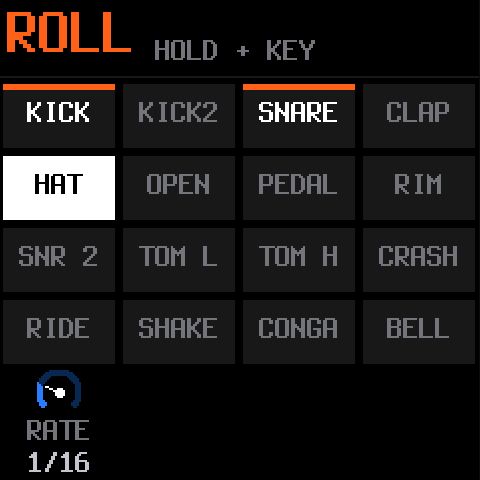
| ARP | ROLL | note repeat: hold a drum key for a roll |
| SEL | KEY | the song’s key; the knobs set chords and scale |
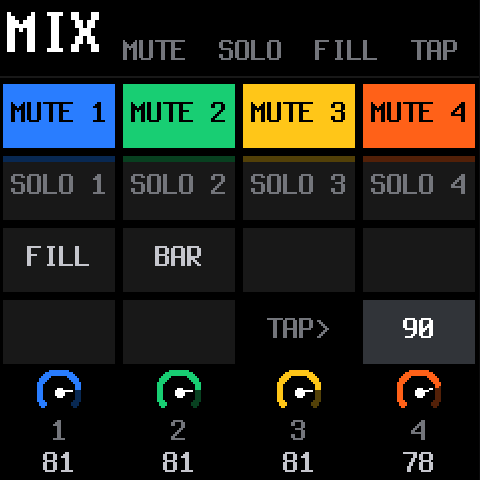
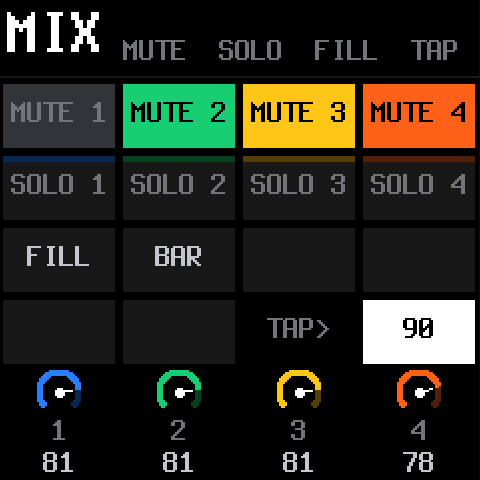
| GLO | MIX | 1–4 mute, 5–8 solo, 9 fill, 16 tap tempo |
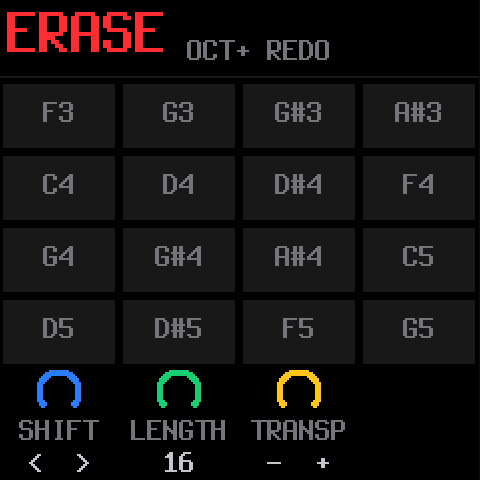
| EDIT | ERASE | erase a sound as the loop plays; EDIT + OCT− is undo |
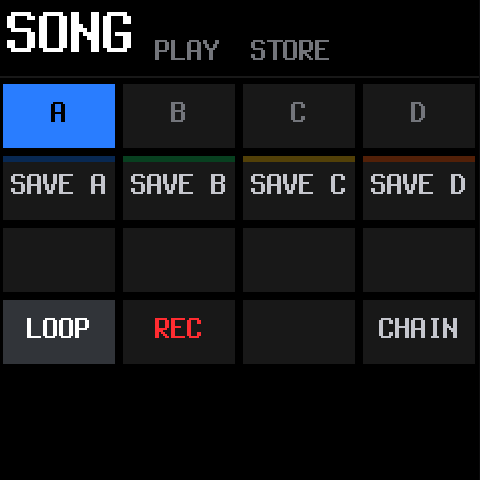
| SAVE | SONG | 1–4 play sections A–D, 5–8 save into them |
SEL is the second button of the top row, between FX and ENV. Some panel drawings label it SCL. Don’t confuse it with the SELECT knob.
Hands full? Hold a layer button and tap HOME to lock the layer open.
2. The controls
| Control | Does |
|---|---|
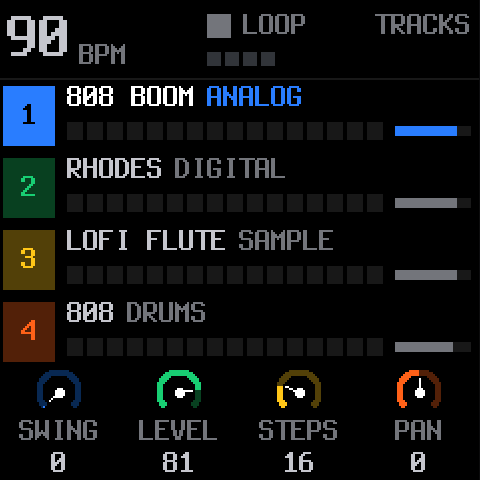
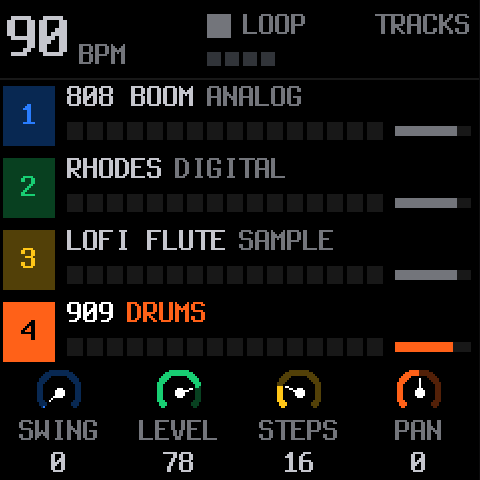
| ALGORITHM | picks the track: 1 · 2 · 3 synths (blue, green, yellow), 4 drums (orange) |
| PRESETS | the track’s sound, or on track 4 the drum kit (37 kits) |
| SELECT | the tempo (on the TRACKS page) |
| PLAY | starts and stops all four tracks; its light flashes on every beat |
| REC | while playing: record now. While stopped: arm. Hold: clear the track |
| OCT− / OCT+ | octave. On the drum track, hold them while you hit for ghost / hard hits |
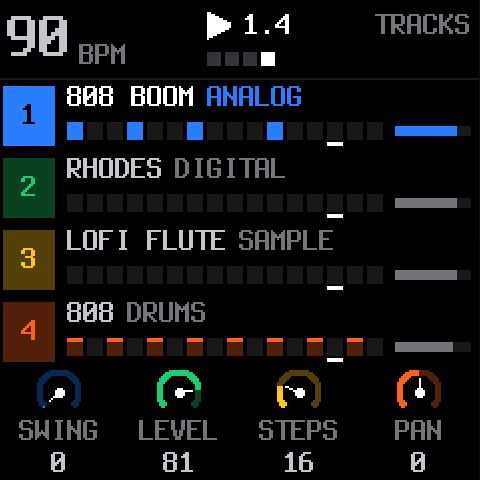
| HOME | the TRACKS page. Hold: the menu |
3. Your first beat
There are two ways. Live is SLOOP’s specialty; steps is the easy start.
With steps:
- Turn ALGORITHM to track 4 (drums), and choose a kit with PRESETS (try 808, 909 or BOOMBAP).
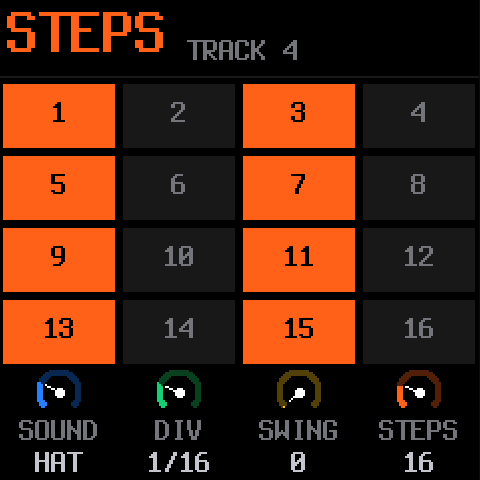
- Hold SEQ for STEPS. KNOB 1 (SOUND) picks the drum sound: KICK, KICK2, SNARE, CLAP, HAT…
- With KICK chosen, tap keys 1, 5, 9, 13. Turn KNOB 1 to SNARE and tap 5, 13. Turn it to HAT and tap every other key.
- Let go of SEQ and press PLAY.
Live, at your own tempo:
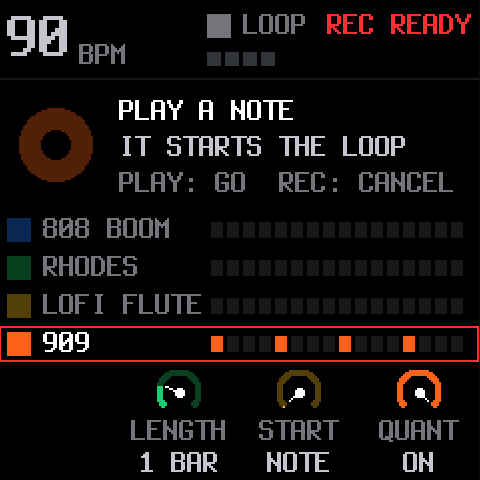
- On track 4, press REC while stopped. The screen says PLAY A NOTE · IT STARTS THE LOOP.
- Play a beat on the white keys (16 drum sounds, kick to cowbell).
- Press REC on the “1” after your last bar. The loop closes, its length sets the tempo, the hits snap to the grid, and it plays straight away.
- Press REC again while it plays to record more on top (overdub).
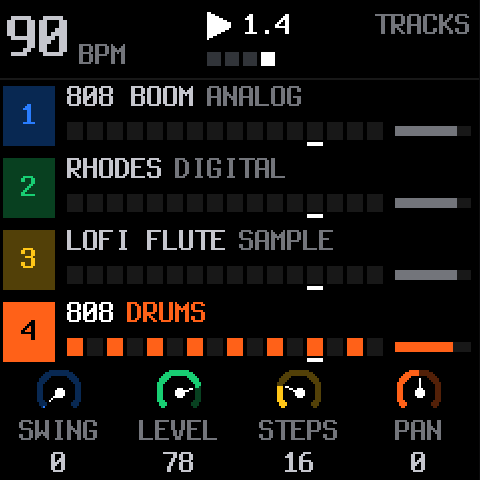
Rolls: hold ARP (ROLL) and hold the HAT key for a hi-hat roll. KNOB 1 sets the rate, 1/8 to 1/64. Rolls are recorded as ratchets.
4. A bassline
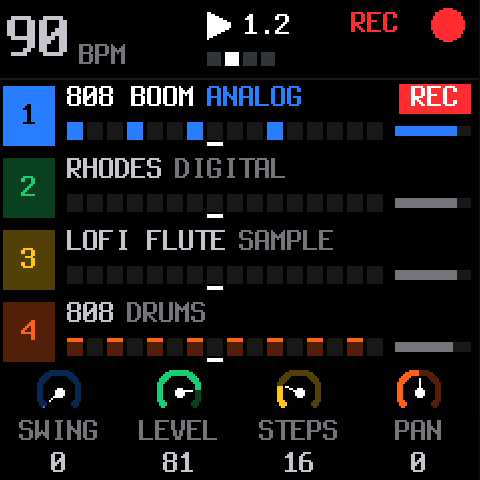
- Turn ALGORITHM to track 1 (blue). The default sound is 808 BOOM; PRESETS browses 153 sounds by kind.
- While the beat plays, press REC and play a bass line on the keys. Notes land where you played them. Press REC again to stop recording.
- Or step it in: hold SEQ, choose a NOTE with KNOB 1, and tap the steps.
5. Chords with one finger
- Turn ALGORITHM to track 2 (green, a Rhodes by default).
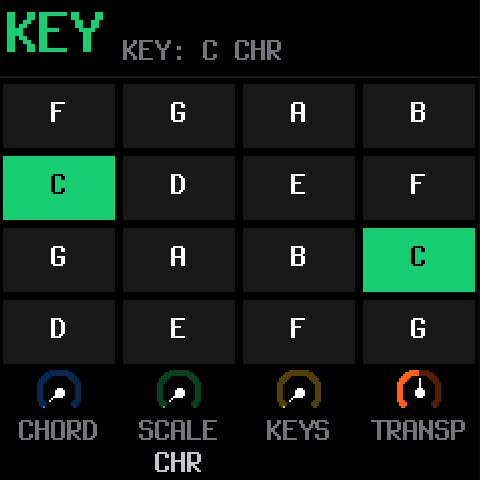
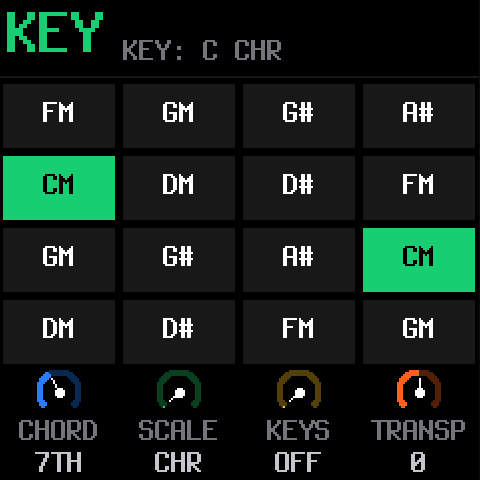
- Hold SEL (KEY) and press the key of your song, for example C.
- Still holding SEL, turn KNOB 1 (CHORD) to 7TH. Now every white key plays a 7th chord in that key. KNOB 2 is the scale.
6. Play it live
- Punch-in effects: hold FX and hold a key. The white keys are loops 1/4–1/32, stutter, reverse, tape stop, half speed, filters, phone and bit crush. The black keys are DJ kills, rewind, octave up, freeze and more. Still holding FX, KNOB 2 = DUST (old sampler grit) and KNOB 3 = DUCK (the kick pumps the synths).
- Mute and solo: hold GLO (MIX). Keys 1–4 mute tracks 1–4, 5–8 solo them, 9 plays a fill while held, and 16 taps the tempo.
- Erase and undo: hold EDIT (ERASE) and press a sound’s key to erase it as the loop plays. EDIT + OCT− is undo, and EDIT + OCT+ is redo.
7. A song in four sections
SLOOP holds one song of four sections, A–D.
- Make a loop you like, then hold SAVE (SONG) and press key 5 (SAVE A).
- Change it, for example by muting the bass or adding a lead, and save into B (key 6), and so on.
- Live: hold SAVE and press keys 1–4 to jump to A–D on the next bar. Keep SAVE held and tap several sections for a quick chain.
- Hold SAVE and press key 14 to record the song as you play it. Tap SAVE on the TRACKS page to edit the song on the SONG screen.
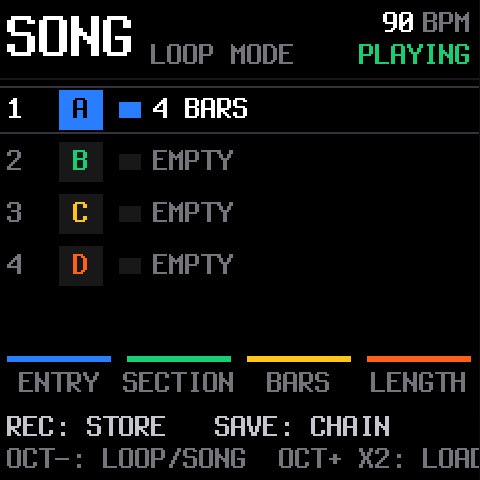
Your work is kept automatically: stop and leave it for 2.5 s and SLOOP autosaves. At power-on it comes back exactly as you left it. For more songs, keep backups with SLOOP’s web editor.
8. Settings
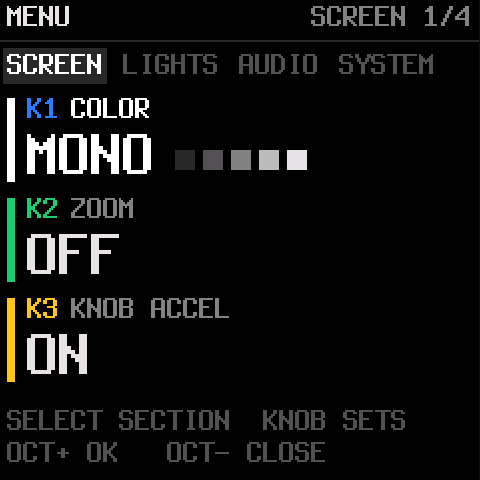
Hold HOME for the menu: SCREEN (colour, zoom, knob speed), LIGHTS (glowing buttons and keys for dark stages), AUDIO (speaker low cut, USB audio level and rate) and SYSTEM. SELECT moves between sections, KNOB 1–3 set the rows, and OCT− closes.
Felucca or SLOOP?
SLOOP is built on Felucca. They share engines and the update path, but they feel very different:
| Felucca | SLOOP | |
|---|---|---|
| Feels like | a multi-engine synth with a deep sequencer | a live groovebox / sampler |
| Tracks | 4, any engine on any track (drums are an engine) | 3 synths + 1 drum track |
| Sounds | 13 engines | 12 synth engines, 153 sounds, 37 drum kits |
| How you work | pages and quick layers; step editing, automation list | hold a button, touch a key; loop recording at your own tempo |
| Sequencer extras | chance, conditions, ratchets, nudge, locks | locks, nudges, fills, ratchets, MPC swing |
| Songs | 16 sections, a lane per track | 4 sections A–D, live chains, record the song as you play |
| Live effects | FX layer on the keys, reverb / echo throws | 27 punch-in effects, DUST, DUCK, a DJ filter |
| Your samples | 3 user slots | 4 slots (~7.4 s each), CHOP in the web editor |
Pick Felucca for sound design and arranging, and SLOOP for jamming and making beats live. Both are free, so try each in fm1-emu before flashing.
Install and go back
- Install: the SLOOP installer in Chrome or Edge over USB. From Linux, use the release’s
.fwscwithfm1_install.py, the same way as installing Felucca from Linux. - Rescue: if the FM-1 no longer starts SLOOP, hold OCT− while switching it on (SLOOP USB RESCUE), then install again.
- Back to stock or to another firmware: back up with SLOOP’s web editor first, then install the other firmware. SLOOP’s installer has Return to the official firmware (V15).
Not affiliated with M-VAVE or isod89. SLOOP is GPL-3.0 software by isod89, based on Felucca by Leo Kuroshita / Hügelton Instruments. The screens are SLOOP 2.7 running in fm1-emu (MIT) by Joakim Eriksson.